
openHAB 5.1 Release
A new release of openHAB is here! openHAB 5.1 arrives with many improvements, most notably a complete modernisation of Main UI, the introduction of a HomeKit Binding for importing Apple-ecosystem devices, and significant updates to JavaScript and Python Scripting.
But that's not all! Following the release of openHAB 5.0 this summer, this release includes many enhancements and bug fixes. Several changes of the openHAB 5.1 release are "under the hood", but often those are the important changes that make our codebase ready for the future, so openHAB can continue to develop steadily.
This release again includes breaking changes, but we have worked hard to provide an upgrade script to make the move to 5.1 as smooth as possible. Please review our official release notes (opens new window) to learn about all breaking changes, new add-ons, enhancements, and fixes.
With that being said, we want to share some statistics that highlight the incredible momentum of our global community and dive into the new features you won't want to miss.
# Activity
Behind every new feature in openHAB 5.1 is the work of a vibrant global community. Over the past release period, activity across our GitHub repositories has been nonstop — reflecting openHAB’s momentum and shared purpose. In total, 124 contributors made 1,967 commits to our GitHub repositories (opens new window).
This release includes contributions across all parts of the system:
- Core (opens new window): 182 pull requests, including 33 bug fixes and 50 enhancements, resulting in 9,663 lines of added code.
- Add-ons (opens new window): 10 new add-ons, 109 fixes, and 151 enhancements across 520 pull requests — adding 228,423 lines of code. In total, our openhab-addons (opens new window) repository now contains nearly 1.4 million lines of code.
- UIs (opens new window): 243 pull requests, 96 bug fixes, and 59 enhancements, totalling 2,827 new lines of code.
Many other repositories (opens new window) — including documentation, openHABian, and build tooling — also receive steady contributions that are too numerous to list here.
Huge thanks to everyone who continues to push openHAB forward!
As usual, it is time to acknowledge the top code contributors per repository (by number of commits) for this release:
- Holger (@holgerfriedrich (opens new window)) for openHAB Core
- Leo (@lsiepel (opens new window)) for openHAB add-ons
- Florian (@florian-h05 (opens new window)) for the openHAB Main UI
- Jeff (@jsjames (opens new window)) for the openHAB Main UI
Many contributors also serve as maintainers, reviewing pull requests, discussing architectural changes, and supporting new contributors. At the time of this release, we have 39 active maintainers across all repositories.
Whether fixing bugs, refining UI elements, updating documentation, or building entirely new integrations, every contribution matters.
# Highlights
As you might have already noticed in the activity statistics, there has been a lot of development on openHAB — too much to list here. Please refer to the release notes (opens new window) to see what's new and noteworthy (including any breaking changes).
In the following sections, our maintainers and contributors introduce a selection of new features you will not want to miss.
# Modernising Main UI: The Leap to Vue 3
Florian Hotze (@florian-h05 (opens new window)), openHAB Maintainer
Main UI was introduced five years ago with the openHAB 3.0 release. Especially in the fast-paced world of web development, a codebase can quickly become "legacy" in that time. I am therefore thrilled to announce that we have completed a massive undertaking:
Upgrading from Vue 2 to Vue 3, Framework7 v5 to Framework7 v7, Vuex to Pinia, and introducing TypeScript into Main UI's codebase.
This not only makes Main UI ready for the future of the Vue ecosystem, but the upgrade and subsequent refactorings have also brought significant performance improvements, especially on older and low-end devices.
The first steps on this long path were taken in May of this year, resulting in a big pull request submitted at the beginning of September that touched roughly 10,000 lines of code. After two months of testing, bug fixing, and review, that PR was merged at the end of October. Since then, we have committed another about 150 changes to address remaining bugs, migrate more code to TypeScript, and implement new features.
A huge thanking you to Jeff James (@jsjames (opens new window)) for starting this effort, and the great collaboration in recent months — and welcome to the Main UI maintainer team!
# Event Source Tracking
Cody Cutrer (@ccutrer (opens new window)), openHAB Maintainer
Have you ever been stumped as to why a particular item is changing states in your system? Have you ever wanted to take different actions in your rules depending on if a command is being sent from an Amazon Echo, the Android app, or from a rule? Event sources let you do that!
Broad-ranging work across many openHAB repositories has been done to tag several events — but in particular Item command and update events — and how they flow through openHAB. Event logging has been updated to include this source information:
2025-12-22 06:40:26.745 [INFO ] [openhab.event.ItemCommandEvent      ] - Item 'NetworkClosetFan_Switch' received command ON (source: org.openhab.automation.jrubyscripting$rule:climate.rb:56)
2025-12-22 06:40:26.745 [INFO ] [penhab.event.ItemStatePredictedEvent] - Item 'NetworkClosetFan_Switch' predicted to become ON
2025-12-22 06:40:26.789 [INFO ] [openhab.event.ItemStateChangedEvent ] - Item 'NetworkClosetFan_Switch' changed from OFF to ON (source: org.openhab.core.thing$homie:device:mosquitto:audiopigpio:gpio25#level)
2025-12-22 06:42:34.678 [INFO ] [openhab.event.ItemCommandEvent      ] - Item 'PorchLights_Dimmer' received command ON (source: org.openhab.ios=>org.openhab.io.openhabcloud$ccutrer@email.com=>org.openhab.core.io.rest)
2025-12-22 06:42:34.678 [INFO ] [openhab.event.ItemStateChangedEvent ] - Item 'PorchLights_Dimmer' changed from 0 to 100 (source: org.openhab.core.autoupdate)
An advanced use case example would be in one rule to check if the event was generated in another rule, and ignore a command if so, preventing a command loop between two rules. More details and examples can be found in the developer documentation.
# Core Runtime Enhancements
openHAB 5.1 brings several improvements to thread management and concurrency handling, as well as refactorings that improve the performance and reliability of Windows USB discovery and add-on suggestions. Beyond these "under the hood" changes, we would like to highlight the following user-facing improvements:
# Default Persistence Deprecated
Mark Herwege (@mherwege (opens new window)), openHAB Contributor
Persistence services have been able to define default persistence strategies for Items. If a persistence service was installed, even without any persistence configuration, all Items would be persisted using those default strategies. This sometimes led to unexpectedly persisting Items, filling databases, using storage, and impacting performance.
Even when a configuration existed, Items not present in the configuration were sometimes persisted before the configuration finished loading. To avoid these issues, we now require an explicit configuration for anything to be persisted.
For new installations, the configuration wizard will still propose a configuration consistent with the previous defaults, but it must be explicitly confirmed. For existing installations being upgraded, the upgrade tool will adjust the configuration to match previous behaviour. Check the upgrade instructions in the official release notes (opens new window) if you use file-based configuration.
File-based configurations are now also visible (but not editable) in the UI. To help avoid inconsistencies and errors, we added a persistence health check (results are visible under Health Issues at the bottom of the Settings page) that highlights problems and links directly to the relevant configurations for fixing them.
# Apply Semantic Tags to File-Based Items
Andrew Fiddian-Green (@andrewfg (opens new window)), openHAB Contributor
Since openHAB 5.0, many bindings have provided default semantic Point and Property tags for their channels.
In the past these tags could be optionally taken over by Items that are configured via the Main UI.
However, this was not possible for Items configured via an .items file.
New in this version, it is possible to configure such Items with useTags=true, which causes the default Point and/or Property tags of the Channel to be applied automatically.
This enhancement simplifies configuration by reducing the need for manual tag assignment.
The useTags=true setting can be applied individually for each channel link of a given Item, or it can be enabled system-wide for all Items via a setting in $OPENHAB_CONF/services/runtime.cfg.
# Main UI Enhancements
Florian Hotze (@florian-h05 (opens new window)), openHAB Maintainer
The openHAB 5.1 release is an important release for Main UI. There may not be as many visible visual changes as in some other releases, but as mentioned above, we have focused heavily on working "under the hood".
# Thing & Item Code Tabs

Jimmy Tanagra (@jimtng (opens new window)), openHAB Maintainer
openHAB 5.1 includes a set of improvements to the Code tabs for the Thing and Item detail pages in Main UI. While the Code tab has existed for a long time, it previously displayed a UI‑internal YAML structure that did not correspond to any of openHAB's real file‑based formats. That made it useful for debugging the UI's internal data, but not very helpful for users who work with openHAB's textual configuration.
In this release, the Code tab now displays file‑compatible syntax:
- YAML output now matches the official file‑based YAML format, including headers and structure
- A new DSL view shows the equivalent textual DSL representation
- Users can switch between YAML and DSL directly within the tab
- Code creation and parsing are handled through new APIs provided by openHAB Core, using the same code that handles the configuration files
These changes make the Code tab more practical for anyone who mixes UI and file‑based configuration, or who simply wants to understand how UI‑defined Things and Items translate into openHAB's standard textual formats.
Many thanks to Laurent Garnier (@lolodomo (opens new window)) for implementing the core part of this feature!
# oh-video Widget
Dan Cunningham (@digitaldan (opens new window)), openHAB Maintainer
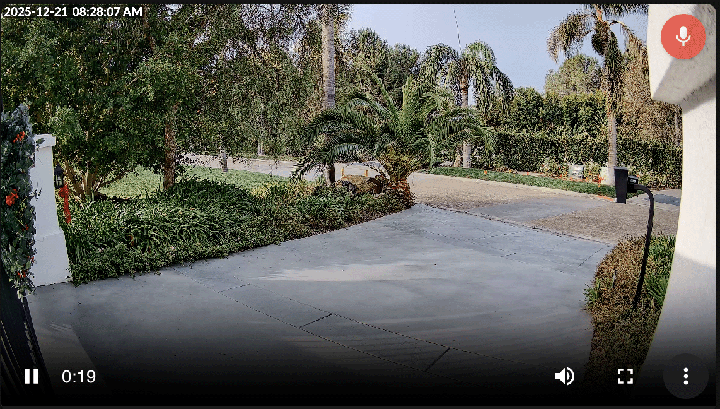
This release also includes a set of meaningful improvements to the oh-video widget, especially for use cases involving cameras and intercom-style devices.
The following enhancements were introduced:
- Two-way audio support for WebRTC streams
- Option to start video playback muted
- Support for Image and String Items as poster images
With the addition of two-way audio, users can both listen and speak through compatible WebRTC video streams. This feature should work with any standard WebRTC service that supports bidirectional audio, which many modern cameras already provide.
The newly released UniFi Protect binding will take direct advantage of this capability, enabling full two-way audio directly within the video widget.
# Visualise Semantic Model Tree for Items
Mark Herwege (@mherwege (opens new window)), openHAB Contributor
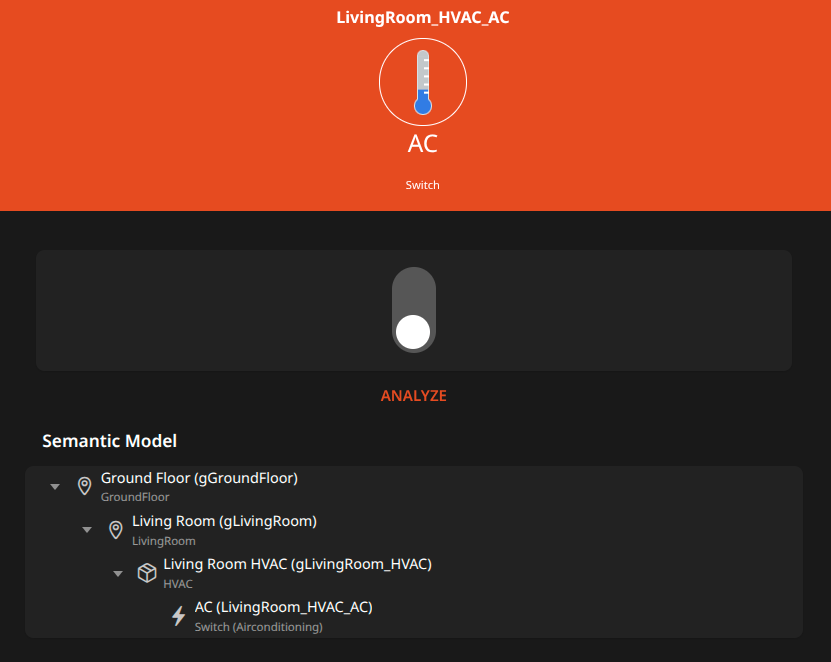
The semantic model is becoming an increasingly important part of configuration for many openHAB users. Previously, only the direct semantic parent of an Item was displayed in the Item detail screen. However, it is often useful to know where an Item fits within the full semantic model hierarchy.
openHAB 5.1 extends the Item detail screen to show the full model tree for both parent and child Items (for children, the model tree is collapsed by default). This also lets you navigate the semantic model tree easily by clicking anywhere in the hierarchy.
# Developer Sidebar
Jimmy Tanagra (@jimtng (opens new window)), openHAB Maintainer
openHAB 5.1 introduces several small but useful improvements to the Developer Sidebar.
# Search Improvement
The sidebar lets you search across Items, Things, Rules, Scripts, Scenes, Pages, Widgets, Transformations, and Persistence configurations, showing matching results so you can inspect objects and jump directly to their editors. In this release, the search feature has been enhanced.
The search field now supports an extended search syntax, allowing more expressive and precise queries:
- Logical OR queries (e.g.
front | back) - Logical AND queries (e.g.
front camera) - Exact Phrase queries (e.g.
"front camera"will matchshow front camerabut notfront side camera) - Anchored queries for matching at the start or end of a word (e.g.
^fanmatchesFan_Switch, whilefan$matchesCeiling_Fan)
This makes it easier to quickly locate the exact entity and perform more targeted debugging. The Developer Sidebar itself remains unchanged, but its search is now far more flexible for anyone building or troubleshooting UI components. For more information on the supported search syntax, have a look at the Fuse.js documentation (opens new window).
# Saved Pins
Previously, pinned objects were lost whenever the page was refreshed or the sidebar was closed, making it difficult to switch between tasks or "workspaces". openHAB 5.1 addresses that limitation by introducing Saved Pins, allowing you to save and restore sets of pinned objects.
You can now save the current set of pinned objects under a custom name and reload that set at any time. Saved collections are stored locally in the browser, so they persist across page reloads and browser restarts. This makes it easier to work on multiple projects, revisit previous debugging sessions, or maintain different pin sets for different parts of your setup — all without losing your place.
# Things, Items & Rules Filtering
Jimmy Tanagra (@jimtng (opens new window)), openHAB Maintainer
openHAB 5.1 introduces new filtering options across the Things, Items, and Rules pages, making it much easier to narrow down large lists using meaningful properties rather than relying solely on text search.
# Things Filtering
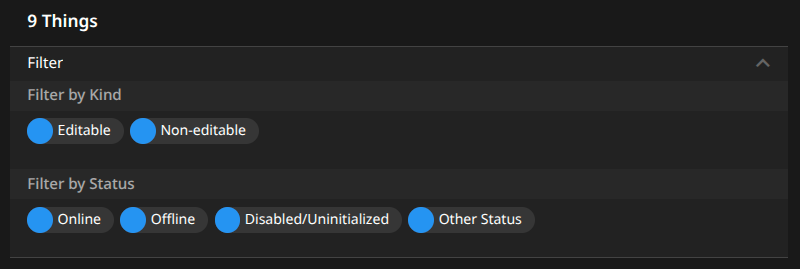
You can now filter Things by:
- Editability (editable / non‑editable)
- Thing status (e.g. ONLINE, OFFLINE)
# Items Filtering
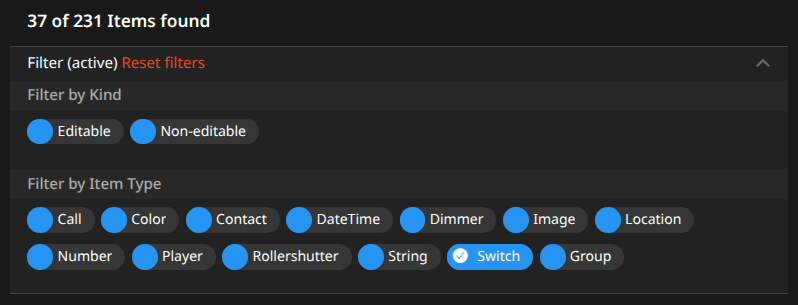
Items can now be filtered by:
- Editability (editable / non‑editable)
- Item type (e.g. Switch, Number, String, Group, etc.)
# Rules Filtering
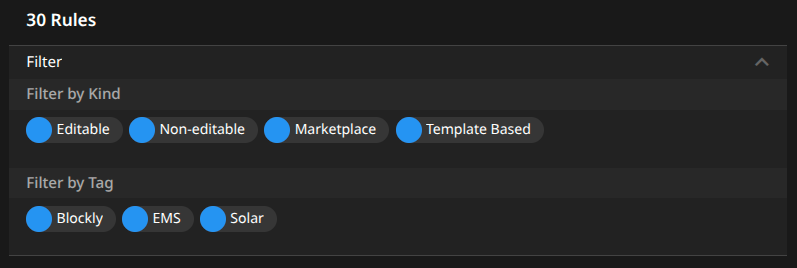
Rules now support filtering by:
- Editability (editable / non‑editable)
- Rule kind (marketplace, template‑based, or user‑defined)
- Tags (existing tag filter retained)
# Blockly Enhancements
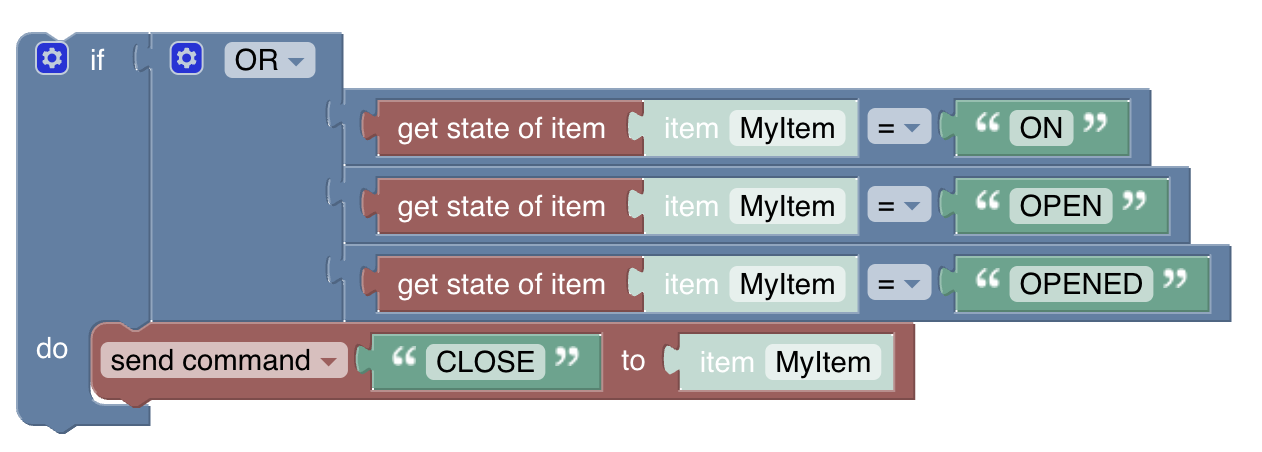
Blockly has also received a major upgrade, including several plugin updates that fix a number of issues with our Vue 3 Main UI.
Additionally, a new logic block allows linking multiple AND or OR statements comfortably without the clutter of deep nesting.
# Basic UI Enhancements
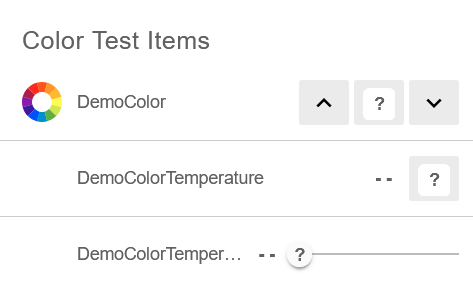
Basic UI now allows distinguishing a NULL or UNDEF state when a switch, slider, color picker, or color temperature picker element is used by superimposing a question mark on the control.
# Add-on Enhancements
openHAB 5.1 brings 10 new add-ons, adding support for new devices:
- FoxInverter Binding: Integrates FoxEss solar inverters and derivatives like the Solakon ONE into openHAB.
- HomeKit Binding: Integrates HomeKit devices into openHAB, see below.
- Lambda Heat Pump Binding: Adds support for monitoring and controlling Lambda Heat Pumps over Modbus.
- Midea AC Binding: Integrates Air Conditions using the Midea protocol, e.g. models from Hyundai, Toshiba, Samsung, and others.
- MSpa Binding: Connects MSpa pools to openHAB.
- Niko Home Control Binding: Adds support for energy meters and EV chargers from the Niko Home Control system.
- Roborock Binding: Integrates robot vacuum cleaners supporting the Roborock protocol, e.g. models from Roborock and Xiaomi.
- Sedif Binding: Retrieves water consumption data for consumers in the Île-de-France region of France.
- SomfyCUL Binding: Adds support for controlling Somfy RTS roller shutters via CUL sticks.
- UniFi Protect Binding: Integrates UniFi Protect cameras and sensors with a robust set of features, including real-time WebRTC audio and video, motion events, image snapshots, and more.
- Viessmann Binding: Connects Viessmann devices such as heat pumps to openHAB using the Viessmann API.
Some existing bindings also received significant improvements:
- Ecovacs Binding: We broadened hardware compatibility by adding support for Deebot T30 (PRO) OMNI and X8 models.
- evcc Binding: We converted the evcc server into a bridge Thing, with chargers, meters, and other devices represented as child Things. This makes the binding future‑proof and adds numerous new channels.
- Fronius Binding: We added several new Thing actions to control hybrid inverter batteries and fixed authentication issues with newer inverter firmware.
- Matter Binding: We expanded device support (including door locks with PIN codes) and upgraded to the latest protocol version.
- Shelly Binding: We added support for several new Gen3 and ZigBee devices and performed a major refactor of device definitions.
- Z-Wave JS Binding: We added roller‑shutter support, notification channels, and unit conversions.
The Home Assistant and Homie bindings have been split from the MQTT binding into separate add-ons. This allows users to only install MQTT add-ons they actually need, reducing confusion and installation size if they are not used. The upgrade tool will automatically install the Home Assistant and Homie add-ons if there are managed MQTT Home Assistant or Homie things.
# HomeKit Binding
With this release, a whole new ecosystem integrates into openHAB:
The new HomeKit Binding unlocks access to devices previously restricted to the Apple Home app. By pairing directly with HomeKit accessories, openHAB can now import devices that support Apple HomeKit natively. This means openHAB users can integrate products from many well-known manufacturers without needing a dedicated binding or relying on reverse-engineered cloud APIs.
Unlike many commercial ecosystems, HomeKit follows a privacy-first, local control approach. Once paired, devices are controlled locally on your network — no mandatory cloud dependency, no vendor lock-in, and no internet round-trips.
This enables local, private, and fast integration of popular devices, including:
- VELUX skylights and blinds
- tado° thermostats and climate devices
- Eve Home energy monitors, valves, and thermostats
Because HomeKit is an established ecosystem, the list of compatible hardware grows automatically without requiring new openHAB bindings for every manufacturer.
The HomeKit binding complements your existing setup, providing the best of both worlds: If a native openHAB binding exists, keep using it — or combine it with the HomeKit binding to avoid cloud-based integrations.
Together with our existing HomeKit integration, which exports openHAB Items to HomeKit, HomeKit is no longer a walled garden — it is a powerful local gateway.
# JavaScript Scripting
Florian Hotze (@florian-h05 (opens new window)), openHAB Maintainer
# Improving Script Actions & Conditions
With openHAB 5.1, we have put a lot of effort into improving the experience for JavaScript scripting users in rules and scripts in Main UI:
- The event object is now the same as for file-based JavaScript, resolving many issues when handling Java types in JavaScript code.
- A new wrapper has been introduced, allowing the use of
let,const,function,classandreturnkeywords to define more complex scripts in script actions and conditions.- The script wrapper is always enabled for script actions, so you can immediately benefit from this enhancement.
- For script conditions, the new wrapper is not enabled by default because enabling it may require modifying existing conditions to keep them working. Please refer to the JavaScript Scripting documentation for more information.
# Configuration as Code
For power users, we have introduced a new way of providing large numbers of Items programmatically, following the configuration-as-code principle. Items, metadata, and Item–Channel links can now be provided through file-based scripts that use functions, loops, and other programming constructs. The main advantage is that it becomes easy to provide the same set of Items for each room, shutter, HVAC, etc., without duplicating definitions. It also removes dependency on static Item names and channel IDs — those can be exported as constants from scripts and reused across JavaScript scripting.
View example
For controlling HVAC, Items may be required for the following:
- current temperature measurement
- target temperature setpoint
- heating on/off
- AC on/off
With file-based DSL configuration, the Items could be defined like this:
Group               gLivingRoom_HVAC                "Living Room HVAC"                      <heating>           (gLivingRoom)                               ["HVAC"]
Number:Temperature  LivingRoom_HVAC_Temperature     "Current Temperature [%.1f %unit%]"     <temperature>       (gLivingRoom_HVAC, gTemperatures)           ["Measurement", "Temperature"]  { unit="°C" }
Number:Temperature  LivingRoom_HVAC_TemperatureSet  "Temperature Setpoint"                  <temperature>       (gLivingRoom_HVAC, gTemperature_Setpoints)  ["Setpoint", "Temperature"]     { unit="°C" }
Switch              LivingRoom_HVAC_Heating         "Heating"                               <temperature_hot>   (gLivingRoom_HVAC, gHeating)                ["Heating", "Switch"]
Switch              LivingRoom_HVAC_AC              "AC"                                    <temperature_cold>  (gLivingRoom_HVAC, gAC)                     ["Airconditioning", "Switch"]

Group               gKitchen_HVAC                   "Kitchen HVAC"                          <heating>           (gKitchen)                                  ["HVAC"]
Number:Temperature  Kitchen_HVAC_Temperature        "Current Temperature [%.1f %unit%]"     <temperature>       (gKitchen_HVAC, gTemperatures)              ["Measurement", "Temperature"]  { unit="°C" }
Number:Temperature  Kitchen_HVAC_TemperatureSet     "Temperature Setpoint"                  <temperature>       (gKitchen_HVAC, gTemperature_Setpoints)     ["Setpoint", "Temperature"]     { unit="°C" }
Switch              Kitchen_HVAC_Heating            "Heating"                               <temperature_hot>   (gKitchen_HVAC, gHeating)                   ["Heating", "Switch"]
To control HVAC for each room, we would need several similar definitions like the above — one block per room. If we later want to change icons or tags, we would need to update every single definition.
Instead of defining each Item in configuration, we can provide them programmatically:
/**
 * Provides HVAC Items.
 * @param {items.Item} room the room to provide for
 * @param {boolean} [withAc=false] whether to include AC Items
 * @returns {items.Item} the HVAC group Item
 */
function provideHvac (room, withAc = false) {
  const hvac = items.addItem({
    type: 'Group',
    name: room.name + '_HVAC',
    label: room.label + ' HVAC',
    category: 'heating',
    groups: [room.name],
    tags: ['HVAC']
  })
  const baseName = getBaseNameFromGroup(hvac)
  items.addItem({
    type: 'Number:Temperature',
    name: baseName + '_Temperature',
    label: 'Current Temperature',
    category: 'temperature',
    groups: [hvac.name, temperatureMeasurements.name],
    tags: ['Measurement', 'Temperature'],
    unit: '°C',
    format: '%.1f %unit%'
  })
  const setpoint = items.addItem({
    type: 'Number:Temperature',
    name: baseName + '_TemperatureSet',
    label: 'Temperature Setpoint',
    category: 'temperature',
    groups: [hvac.name, temperatureSetpoints.name],
    tags: ['Setpoint', 'Temperature'],
    unit: '°C'
  })
  setpoint.postUpdate('22 °C')
  const localHeating = items.addItem({
    type: 'Switch',
    name: baseName + '_Heating',
    label: 'Heating',
    category: 'temperature_hot',
    groups: [hvac.name, heating.name],
    tags: ['Switch', 'Heating']
  })
  localHeating.postUpdate('OFF')
  if (withAc) {
    const cooling = items.addItem({
      type: 'Switch',
      name: baseName + '_AC',
      label: 'AC',
      category: 'temperature_cold',
      groups: [hvac.name, airConditioning.name],
      tags: ['Switch', 'Airconditioning']
    })
    cooling.postUpdate('OFF')
  }
  return hvac
}

const livingRoom = items.addItem({
  type: 'Group',
  name: 'gLivingRoom',
  label: 'Living Room',
  category: 'sofa',
  groups: [groundFloor.name],
  tags: ['LivingRoom']
})
const livingRoomHvac = provideHvac(livingRoom, true)

const kitchen = items.addItem({
  type: 'Group',
  name: 'gKitchen',
  label: 'Kitchen',
  category: 'kitchen',
  groups: [groundFloor.name],
  tags: ['Kitchen']
})
provideHvac(kitchen)
The above code requires more lines to define Items than the configuration example, but once you need the same Items for many rooms (e.g. 20), calling the function repeatedly is far easier than duplicating definitions.
Refer to the JavaScript Scripting documentation.
# Python Scripting
Holger Hees (@HolgerHees (opens new window)), openHAB Maintainer
The Python Scripting add-on has made a major step forward:
- GraalVM has been updated, now supporting Python 3.12, and is now shared between JavaScript Scripting, Home Assistant, and Python Scripting.
- The helper libraries have been updated to the latest version.
- Support for virtual environments (VEnv) and native modules has been implemented.
- Console commands for the Karaf console have been added, including access to an interactive Python console.
- Support for autocompletion in IDEs has been added.
- The add-on has been refactored and optimised in many ways, fixing a number of bugs and introducing a few breaking changes.
A detailed overview of these changes is available in the related Pull Request (opens new window).
# iOS App Enhancements
Dan Cunningham (@digitaldan (opens new window)), openHAB Maintainer
For the better part of a year, the iOS team has been hard at work modernising the app’s core runtime and overall structure. These changes bring the openHAB iOS app up to current platform standards, make it significantly easier to maintain, and allow us to ship App Store releases much more frequently — alongside regular TestFlight builds.
I would like to extend a sincere thank-you to Tim Bert (@timbms (opens new window)) and Tassilo Karge (@TAKeanice (opens new window)) for their heroic efforts in making this possible. The sheer volume of work, commits, and attention to detail involved is nothing short of impressive.
After initially announcing these upcoming changes this summer, we are thrilled that version 3.1 of the iOS app is now officially available on the App Store! Since that announcement was quite a while ago, here's a quick recap of the new features, fulfilling several of our most requested improvements and making the app more powerful and enjoyable to use:
# Multiple Homes
Seamlessly switch between all of your openHAB homes. Managing a second property, an office, or a vacation home is now effortless and fully integrated into the app experience.
# Refined Interface
Settings are clearer, icons are more consistent, and dark mode has been refined for a cleaner, more polished appearance. The app icon also supports the latest iOS display options.
# Improved Dashboards and Widgets
Charts, widgets, video streams, and other visual components have been enhanced and now behave more reliably and consistently throughout the app.
# Greatly Improved Performance
The app feels noticeably more responsive thanks to significant performance improvements across networking, notifications, video, charts, and input handling. Many long-standing issues, bugs, and crashes have been resolved in this release.
# Kiosk and Wall-Mount Features
A new built-in screensaver provides a clean, elegant dashboard view for wall-mounted devices. The app now supports command Items for device control, local notifications, and navigation actions for both Main UI and Sitemaps.
# Apple Watch Enhancements
The watch companion app has received numerous upgrades and backend improvements, including enhanced networking, more consistent icon handling, and improved authentication — resulting in a smoother and more reliable experience.
# openHAB on macOS: Announcing the Official Homebrew Tap
Florian Hotze (@florian-h05 (opens new window)), openHAB Maintainer
For a long time, macOS users have typically run openHAB by manually downloading and extracting the distribution archive. With the release of openHAB 5.1, we are making the installation and update process significantly smoother for the Mac community by introducing an openHAB Homebrew Tap.
Homebrew is the de facto standard package manager for macOS. Our new tap allows you to install, manage, and run openHAB as a background service, providing packages for both stable and milestone releases. By using the tap, openHAB integrates into the macOS system, allowing it to run as a background service (through launchd) that starts automatically at login. This eliminates the need to keep a terminal window open or manually run startup scripts.
One of the most significant benefits of this new distribution method is the inclusion of the openHAB CLI tool. Previously exclusive to our Debian and RPM packages, the openhab-cli is now available on macOS through Homebrew. This provides a centralised way to:
- Access the openHAB Console (Karaf).
- Manage Backups and Restores.
- Clear the Cache and view logs effortlessly.
While we still recommend our APT or RPM packages for Linux environments, the Homebrew tap provides the most integrated and "Mac-native" experience for those running on Apple hardware.
For installation instructions and a full list of commands, please refer to the openHAB on macOS documentation.
# Enjoy and Get in Touch!
We are excited to see what you will do with the new features and improvements in openHAB 5.1 — your feedback is always welcome! As always, our community forum (opens new window) is there for questions, comments, and discussions. Do not hesitate to get in touch, join our community, receive help, and share your experiences and use cases.